USB C vs Lightning Explained: Faster Only on iPhone Pro Models
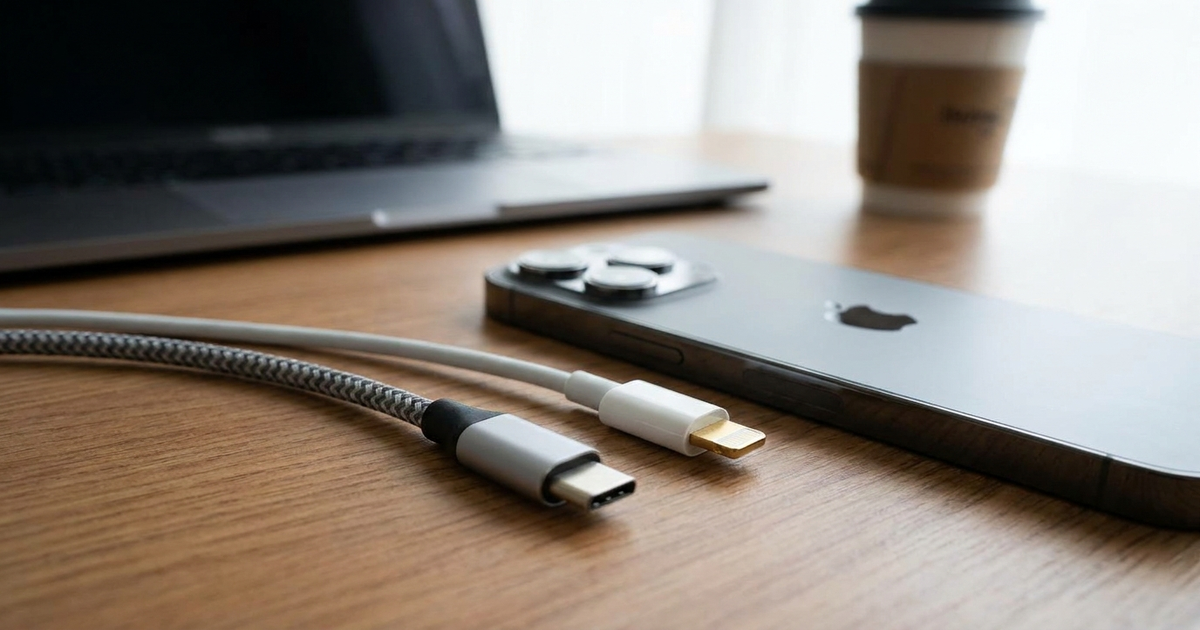
Short answer: USB-C is the standard connector that replaced Lightning on iPhones, but it is only faster on the Pro models. Apple says the iPhone 18 Pro, 17 Pro, 16 Pro and 15 Pro support USB 3.2 Gen 2 speeds of up to 10Gbit per second, and only with a USB 3 cable. The base iPhone 17 and the iPhone Air stay at USB 2 (480 Mb/s), the same ceiling Lightning had. The cable in the box supports charging and USB 2 speeds, so a new Pro iPhone with its bundled cable transfers no faster than an old Lightning one.
By Chester Takau · Updated November 2026
What data speed will you actually get?
Your speed is the lower of what the phone supports and what the cable supports. Figures come from Apple's USB-C support page and the reports cited below.
Why did Apple switch from Lightning to USB-C?
Mostly because the EU forced it. The common-charger rule, Regulation 2022/2380, applied to phones and tablets from December 2024, and it now covers new laptops with power delivery up to 100W as of 28 April 2026, according to Guru3D. In February 2025 Apple stopped selling new iPhones with Lightning when the iPhone 16e launched, as MacRumors reported.
The money side matters too. Lightning accessories came through Apple's MFi licensing program, so each cable maker paid Apple a cut. Marques Brownlee walks through that history in his video on the law.
As Marques Brownlee puts it in his explainer on the EU law:
"it's been almost a decade and lightning is kind of an old outdated port at this point"
The quote is from auto-generated captions, so punctuation may differ slightly. The video is from November 2022, long before the iPhone 18 lineup.
The comparison table
| Lightning | USB-C on base iPhone 17, Air, 17e | USB-C on Pro (15 Pro to 18 Pro) | |
|---|---|---|---|
| Data speed | USB 2, 480 Mb/s | USB 2, 480 Mb/s | Up to 10Gbit/s (USB 3.2 Gen 2), USB 3 cable needed |
| Bundled cable | Lightning cable | USB-C cable, USB 2 speeds | USB-C cable, USB 2 speeds |
| Wired external display | Not a USB-C feature | Apple lists the iPhone 17 but not the 16e or 17e | Up to 4K60 over DisplayPort (Apple) |
| Works with other devices | Apple gear only | iPad, Mac and Android chargers and cables | Same |
| Cable confusion | Low, cables are simple | High, cables look alike but differ in speed and wattage | High, and some are charge-only |
| Where it still ships | Older iPhones, older AirPods cases, first AirPods Max, older Siri Remotes, discontinued MagSafe accessories | Current iPhones | Current iPhones |
Compiled from Apple's USB-C support page, BGR and AppleScoop's Lightning inventory. Pro rows reflect Apple's own list of 10Gbit models.
Does a USB-C iPhone transfer files faster than a Lightning one?
Only a Pro model with a USB 3 cable does. The base iPhone 17 and iPhone Air are held to USB 2 speeds, as BGR explains, so a "USB-C" label there does not mean faster transfers. Apple also ships a USB 2 cable in the box even with the Pro phones, which is why people on forums wonder why their new iPhone is no quicker than the old one.
Rumors in June 2026 suggested the iPhone 18 Pro might reach Thunderbolt speeds. Apple's support page lists 10Gbps USB 3.2 Gen 2 instead, not Thunderbolt.
Is charging faster on USB-C?
I could not find a neutral head-to-head charge-time test for the same iPhone on both ports, so I won't print one. What the sources do say is that wattage depends on the cable and adapter. Macworld's 2026 cable guide stresses that USB-C cables differ a lot in wattage as well as data speed, which Lightning owners never had to think about. One firm number: Apple says its USB-C to Lightning Adapter caps charging at 24W.
If wireless is your main charging method, the cable matters less. The comparison of MagSafe and Qi2 charging speeds covers what the iPhone 18 Pro can pull without a cable.
Is USB-C less durable than Lightning?
The evidence is anecdotal on both sides. Some MacRumors threads report a USB-C port that loosens or a cable that wiggles or pops out in the car. Replies there often say debris is the cause and cleaning fixes it, or that it is a one-off defect. Lightning's defenders argue that the springs sit in the cable, so the cheap part wears out, and one explainer from HelpDeskGeek agrees. USB-C fans point out it does not clog with lint as easily. I found no controlled durability test, so treat both claims as opinion. A YouTube comparison of Apple's woven USB-C cable against its USB-C to Lightning cable exists, but I could not confirm the channel behind it.
Can I still use my old Lightning cables and accessories?
Not directly in a USB-C iPhone. Apple's recommended route is the USB-C to Lightning Adapter, which supports power, data and audio. That helps for older Lightning headphones, docks and speakers. Charging through it tops out at 24W.
CarPlay is the common snag. A car with a Lightning or USB-A setup needs a data-capable cable, and a charge-only USB-C cable will not start it. Apple Community threads show people hitting exactly this.
Lightning has not vanished from the ecosystem yet. It remains on older AirPods cases, the first AirPods Max, legacy iPhones, older Siri Remotes and discontinued MagSafe accessories.
How to pick a USB-C cable for an iPhone
- Want 10Gbps on a Pro phone: buy a cable explicitly rated for USB 3 / 10Gbps. The box cable will not do it.
- Charging only: any good cable rated for your adapter's wattage works, and the data speed is irrelevant.
- CarPlay or file transfer: avoid charge-only cables.
- Unmarked cable in a drawer: assume 480 Mb/s until proven otherwise.
The evidence block: what this article adds
Most comparison pages are vendor blogs with old specs and a blanket claim that USB-C is faster. This piece puts the iPhone lineup against Apple's own support page in one place and shows where "USB-C" and "Lightning" end up at the same 480 Mb/s. It is a research synthesis. I have not run my own transfer or charge-time tests, and I flag the places where no independent test exists.
FAQ
Is USB-C better than Lightning?
For compatibility, yes: one cable for iPhone, iPad, Mac and Android. For speed, only on Pro models with a USB 3 cable.
Why is my new iPhone no faster than Lightning?
Either it is a base model or Air, limited to USB 2, or you are using the bundled USB 2 cable.
Does the iPhone 17 support Lightning cables?
Not natively. You need Apple's USB-C to Lightning Adapter for older accessories.
Does my iPhone support an external display over USB-C?
Apple lists USB-C external display support, up to 4K60 over DisplayPort, for the iPhone 18 Pro, 17, 16 and 15, but not the 16e or 17e.
Sources
- Apple Support: Charge and connect with the USB-C connector on your iPhone
- Apple Support: About the USB-C to Lightning Adapter
- MacRumors: Apple phases out Lightning port with iPhone 16e launch (2025-02-19)
- Guru3D: EU mandates USB-C charging for all new laptops (2026-04-28)
- BGR: The iPhone Air and 17's USB-C port has one big shortcoming
- Macworld: Best USB-C and Thunderbolt cables for iPhone, iPad and Mac 2026
- AppleScoop: Which Apple products still use Lightning in 2026
- Plug.tech: iPhone 18 USB-C rumors (June 2026)
- MacRumors forums: Loose USB-C, little wiggle
- HelpDeskGeek: USB-C vs Lightning durability
- YouTube: The iPhone USB-C Law: Explained! (MKBHD, 2022)
Updated November 2026.
Transparency note: This article was researched and written by Chester Takau with AI assistance for research gathering and drafting. All recommendations reflect the author's own editorial judgment.